
Microsoft Announces Windows 11 Taskbar Repositioning Features
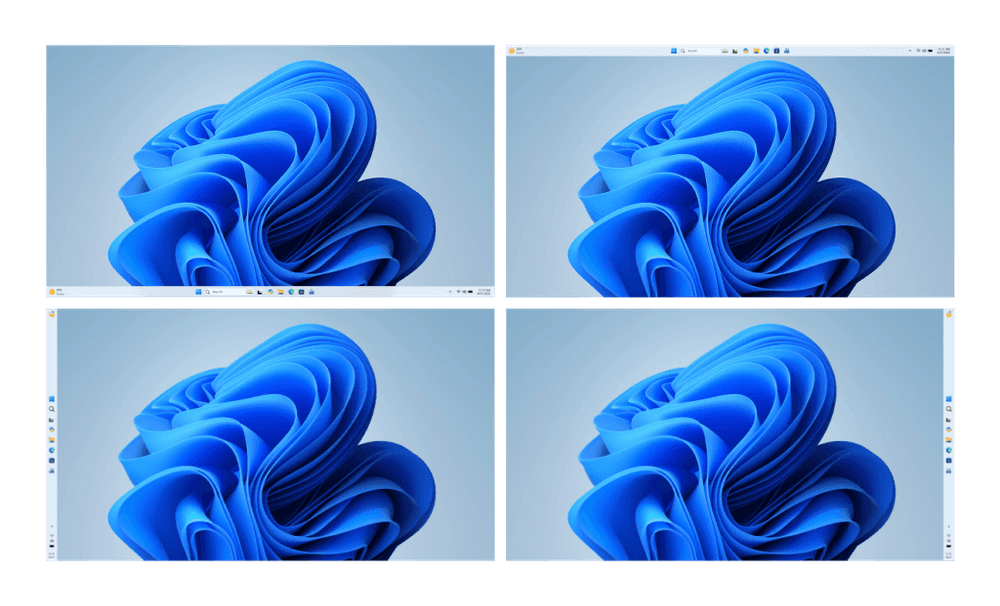
Microsoft announced on March 20, 2026, that Windows Insider Program participants will soon receive access to test a highly requested feature: the ability to move the Windows 11 taskbar to different screen positions. The update represents the first major taskbar positioning enhancement since Windows 11's initial release, addressing one of the most frequent user complaints about the operating system's interface limitations.
The upcoming Insider preview will include support for vertical taskbar positioning, allowing users to dock the taskbar along the left or right edges of their displays. This functionality restores capabilities that were available in Windows 10 but were removed when Microsoft redesigned the interface for Windows 11. The company has been working on this feature following sustained feedback from enterprise users and power users who rely on vertical taskbar configurations for productivity workflows.
Beyond vertical positioning, the preview build will introduce additional taskbar placement options, including corner positioning capabilities. These changes suggest Microsoft is moving toward a more flexible interface design philosophy for Windows 11, potentially addressing criticism that the operating system became too rigid compared to its predecessor. The announcement comes as part of Microsoft's broader effort to refine Windows 11's user experience based on community feedback collected through the Windows Insider Program.
The development represents a significant technical undertaking, as Windows 11's taskbar was completely rewritten from the Windows 10 codebase. Microsoft engineers had to rebuild the positioning logic while maintaining compatibility with existing applications and system integrations. The company has been testing internal builds for several months to ensure the repositioned taskbar maintains full functionality with features like widgets, search, and task view.
Related: Windows XP Bliss Wallpaper Gets Windows 11 Bloom Remix
Related: Windows 11 Gets New GPO to Remove Preinstalled Apps
Related: Windows 11 March Optional Update Hits Release Preview
Related: Windows Feedback Hub Gets Redesigned Interface for Insiders
Windows Insider Program Members Get First Access
Windows Insider Program participants across all channels will be the first to experience the movable taskbar functionality. Microsoft typically releases such features to the Dev Channel initially, followed by Beta Channel distribution, and eventually Canary Channel testing. The phased rollout approach allows Microsoft to identify and resolve compatibility issues before the features reach the stable Windows 11 release branch used by mainstream consumers and enterprise customers.
The update will particularly benefit users running multi-monitor setups, where vertical taskbar positioning can maximize screen real estate on ultrawide displays or portrait-oriented secondary monitors. Enterprise environments that standardized on Windows 10's vertical taskbar configurations will find the restoration of this functionality crucial for maintaining established workflows and user training investments.
System requirements for the taskbar positioning features remain consistent with standard Windows 11 hardware requirements. Users need devices running Windows 11 version 22H2 or later, with no additional hardware specifications required for the interface changes. The features will work across all Windows 11 editions, including Home, Pro, Enterprise, and Education variants, ensuring broad compatibility across Microsoft's customer base.
How to Access and Configure the New Taskbar Options
Windows Insider participants can expect the movable taskbar features to appear in upcoming preview builds through the standard Windows Update mechanism. Users enrolled in the Windows Insider Program should check Settings > Update & Security > Windows Insider Program to ensure they're receiving the latest preview builds. The taskbar positioning options will likely be accessible through the existing taskbar context menu or through Settings > Personalization > Taskbar.
Configuration of vertical taskbar positioning will follow Microsoft's established interface patterns, with right-click context menus providing access to positioning options. Users can expect settings for left-side, right-side, top, and bottom taskbar placement, similar to the flexibility available in Windows 10. The interface will include preview options allowing users to see how their taskbar configuration will appear before applying changes.
Microsoft recommends that Insider participants test the new positioning features on non-production systems initially, as preview builds may contain stability issues or compatibility problems with certain applications. Users should backup their current taskbar configuration and pin arrangements before experimenting with the new positioning options. Windows Central reports that the features represent part of a broader Windows 11 interface improvement initiative planned for 2026.